What Is eBPF, and Why Should You Care?
eBPF (extended Berkeley Packet Filter) started life as a packet filtering mechanism, but it has evolved into a general-purpose in-kernel virtual machine. The key properties that make it so powerful:
Safety. eBPF programs are verified before they run. The kernel’s built-in verifier performs static analysis to guarantee your program terminates, doesn’t access out-of-bounds memory, and doesn’t crash the kernel. You get kernel-level access with userspace-level safety guarantees.
Performance. eBPF programs are JIT-compiled to native machine code. There’s no interpreter overhead once loaded. You’re running at near-native speed.
No kernel rebuilds. Traditional kernel instrumentation meant writing a kernel module or patching the kernel itself. eBPF programs are loaded dynamically at runtime.
Architecture Overview
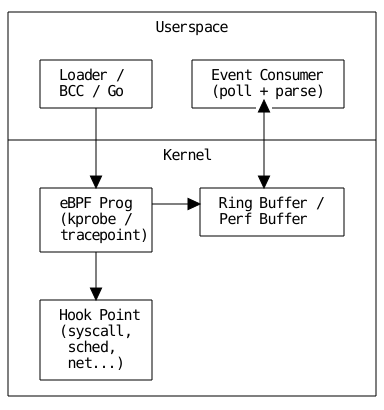
An eBPF tracing tool has two distinct halves:
The kernel side is a small eBPF program written in restricted C. It attaches to a kernel hook point (a tracepoint, kprobe, or similar), executes when that hook fires, and writes event data into a shared data structure.
The userspace side is a regular program (we’ll use Python with BCC, then show a pure C/libbpf approach) that loads the eBPF program into the kernel, reads events from the shared data structure, and processes or displays them.
The two halves communicate through eBPF maps. kernel-resident data structures that both sides can read and write. For tracing, we’ll primarily use a ring buffer (or perf buffer) to stream events from kernel to userspace.
Prerequisites
You’ll need a Linux system with kernel 5.8 or later (for ring buffer support; 4.18+ works for perf buffers). Here’s what to install:
 1
 2
 3
 4
 5
 6
 7
 8
 9
10
11
| # Ubuntu / Debian
sudo apt-get update
sudo apt-get install -y \
build-essential \
clang \
llvm \
libelf-dev \
linux-headers-$(uname -r) \
libbpf-dev \
bpfcc-tools \
python3-bpfcc
|
Verify your setup:
1
2
3
4
5
6
7
8
| # Check kernel version
uname -r
# Verify BPF support
ls /sys/kernel/btf/vmlinux 2>/dev/null && echo "BTF available" || echo "No BTF"
# Quick sanity check
sudo bpftool prog list
|
If btf/vmlinux exists, you have BTF (BPF Type Format) support, which makes everything significantly easier.
Part 1: Python
Let’s start with BCC (BPF Compiler Collection) because it has the lowest barrier to entry. BCC lets you embed eBPF C code as a string inside a Python script. it handles compilation, loading, and attachment for you.
We’ll build a tool that traces openat system calls and logs every file being opened on the system, along with the process name and PID.
The Code
Create a file called trace_open.py:
 1
 2
 3
 4
 5
 6
 7
 8
 9
10
11
12
13
14
15
16
17
18
19
20
21
22
23
24
25
26
27
28
29
30
31
32
33
34
35
36
37
38
39
40
41
42
43
44
45
46
47
48
49
50
51
52
53
54
55
56
57
58
| #!/usr/bin/env python3
from bcc import BPF
from time import strftime
# eBPF program
bpf_program = """
#include <uapi/linux/ptrace.h>
#include <linux/sched.h>
struct event_t {
u32 pid;
u32 uid;
char comm[TASK_COMM_LEN]; // 16 bytes
char filename[256];
};
BPF_PERF_OUTPUT(events);
TRACEPOINT_PROBE(syscalls, sys_enter_openat) {
struct event_t event = {};
event.pid = bpf_get_current_pid_tgid() >> 32;
event.uid = bpf_get_current_uid_gid() & 0xFFFFFFFF;
bpf_get_current_comm(&event.comm, sizeof(event.comm));
bpf_probe_read_user_str(
&event.filename,
sizeof(event.filename),
args->filename
);
events.perf_submit(args, &event, sizeof(event));
return 0;
}
"""
# Userspace side
b = BPF(text=bpf_program)
def print_event(cpu, data, size):
event = b["events"].event(data)
print(
f"{strftime('%H:%M:%S')} "
f"pid={event.pid:<8d} "
f"uid={event.uid:<6d} "
f"{event.comm.decode('utf-8', 'replace'):<16s} "
f"{event.filename.decode('utf-8', 'replace')}"
)
print(f"{'TIME':<10s} {'PID':<13s} {'UID':<7s} {'COMM':<16s} FILENAME")
print("-" * 80)
b["events"].open_perf_buffer(print_event)
try:
while True:
b.perf_buffer_poll()
except KeyboardInterrupt:
print("\nDetaching...")
|
Run it with:
1
| sudo python3 trace_open.py
|
You’ll see a live stream of every file being opened on the system. Open a new terminal and run cat /etc/hostname. you’ll see it appear in the trace output.
Walking Through the Code
There are a few important things happening here.
The struct event_t defines the shape of data we pass from kernel to userspace. Keep these structs small. you’re writing into a fixed-size perf buffer, and large structs can cause dropped events under load.
TRACEPOINT_PROBE(syscalls, sys_enter_openat) attaches our function to a stable kernel tracepoint. Tracepoints are preferred over kprobes when available because their interface is stable across kernel versions. You can list all available tracepoints with sudo ls /sys/kernel/debug/tracing/events/.
bpf_probe_read_user_str is critical. You cannot simply dereference a userspace pointer from eBPF. the verifier won’t allow it. This helper safely copies a string from user memory into the eBPF stack.
BPF_PERF_OUTPUT and perf_submit set up the kernel-to-userspace communication channel. Each CPU gets its own perf buffer, and the Python side polls all of them.
Part 2: Adding Filtering and Aggregation
Raw tracing is noisy. Let’s add PID filtering and a histogram of which files are opened most frequently.
 1
 2
 3
 4
 5
 6
 7
 8
 9
10
11
12
13
14
15
16
17
18
19
20
21
22
23
24
25
26
27
28
29
30
31
32
33
34
35
36
37
38
39
40
41
42
43
44
45
46
47
48
49
50
51
52
53
54
55
56
57
58
59
60
61
62
63
64
65
66
67
68
69
70
71
72
73
74
75
76
77
78
79
80
81
82
83
84
85
86
| #!/usr/bin/env python3
from bcc import BPF
from collections import Counter
from time import strftime, sleep
import signal
import sys
target_pid = int(sys.argv[1]) if len(sys.argv) > 1 else 0
bpf_program = f"""
#include <uapi/linux/ptrace.h>
#include <linux/sched.h>
#define TARGET_PID {target_pid}
struct event_t {{
u32 pid;
char comm[TASK_COMM_LEN];
char filename[256];
u64 timestamp_ns;
}};
BPF_PERF_OUTPUT(events);
TRACEPOINT_PROBE(syscalls, sys_enter_openat) {{
u32 pid = bpf_get_current_pid_tgid() >> 32;
// Filter by PID if one was specified
if (TARGET_PID != 0 && pid != TARGET_PID)
return 0;
struct event_t event = {{}};
event.pid = pid;
event.timestamp_ns = bpf_ktime_get_ns();
bpf_get_current_comm(&event.comm, sizeof(event.comm));
bpf_probe_read_user_str(
&event.filename,
sizeof(event.filename),
args->filename
);
events.perf_submit(args, &event, sizeof(event));
return 0;
}}
"""
b = BPF(text=bpf_program)
file_counts = Counter()
event_count = 0
def print_event(cpu, data, size):
global event_count
event = b["events"].event(data)
filename = event.filename.decode("utf-8", "replace")
file_counts[filename] += 1
event_count += 1
print(
f"{strftime('%H:%M:%S')} "
f"pid={event.pid:<8d} "
f"{event.comm.decode('utf-8', 'replace'):<16s} "
f"{filename}"
)
def print_summary(signum, frame):
print(f"\n{'='*60}")
print(f"Summary: {event_count} total open() calls")
print(f"{'='*60}")
print(f"\nTop 20 most opened files:\n")
for fname, count in file_counts.most_common(20):
bar = "█" * min(count, 40)
print(f" {count:>6d} {bar} {fname}")
sys.exit(0)
signal.signal(signal.SIGINT, print_summary)
if target_pid:
print(f"Tracing openat() for PID {target_pid}... Ctrl+C for summary.")
else:
print("Tracing all openat() calls... Ctrl+C for summary.")
b["events"].open_perf_buffer(print_event)
while True:
b.perf_buffer_poll()
|
Now you can trace a specific process and get a histogram when you’re done:
1
2
3
4
5
| # Trace everything
sudo python3 trace_open_filtered.py
# Trace a specific PID
sudo python3 trace_open_filtered.py 1234
|
Part 3: The libbpf/C Approach
BCC is great for prototyping but has drawbacks in production: it requires kernel headers on the target machine, compiles eBPF code at runtime, and has a heavy dependency footprint. For production tooling, the modern approach is libbpf + CO-RE (Compile Once, Run Everywhere).
With CO-RE, you compile your eBPF program once and it runs on any kernel version (that supports BTF) without recompilation.
Project Structure
1
2
3
4
5
| ebpf-tracer/
├── Makefile
├── tracer.bpf.c # eBPF kernel program
├── tracer.h # Shared types (kernel + userspace)
└── tracer.c # Userspace loader + consumer
|
 1
 2
 3
 4
 5
 6
 7
 8
 9
10
11
12
13
14
15
| #ifndef __TRACER_H
#define __TRACER_H
#define MAX_FILENAME_LEN 256
#define TASK_COMM_LEN 16
struct event {
__u32 pid;
__u32 uid;
__u64 timestamp_ns;
char comm[TASK_COMM_LEN];
char filename[MAX_FILENAME_LEN];
};
#endif /* __TRACER_H */
|
eBPF Program. tracer.bpf.c
 1
 2
 3
 4
 5
 6
 7
 8
 9
10
11
12
13
14
15
16
17
18
19
20
21
22
23
24
25
26
27
28
29
30
31
32
33
34
35
36
37
| // SPDX-License-Identifier: GPL-2.0
#include "vmlinux.h"
#include <bpf/bpf_helpers.h>
#include <bpf/bpf_tracing.h>
#include <bpf/bpf_core_read.h>
#include "tracer.h"
struct {
__uint(type, BPF_MAP_TYPE_RINGBUF);
__uint(max_entries, 1 << 24); // 16 MB
} events SEC(".maps");
SEC("tracepoint/syscalls/sys_enter_openat")
int trace_openat(struct trace_event_raw_sys_enter *ctx)
{
struct event *e;
e = bpf_ringbuf_reserve(&events, sizeof(*e), 0);
if (!e)
return 0;
e->pid = bpf_get_current_pid_tgid() >> 32;
e->uid = bpf_get_current_uid_gid() & 0xFFFFFFFF;
e->timestamp_ns = bpf_ktime_get_ns();
bpf_get_current_comm(&e->comm, sizeof(e->comm));
// args->filename is the second argument (index 1)
const char *filename = (const char *)ctx->args[1];
bpf_probe_read_user_str(
&e->filename, sizeof(e->filename), filename
);
bpf_ringbuf_submit(e, 0);
return 0;
}
char LICENSE[] SEC("license") = "GPL";
|
A few things to note about this approach compared to BCC. We include vmlinux.h instead of individual kernel headers. this is a single header generated from your kernel’s BTF data that contains every kernel type. You generate it with bpftool btf dump file /sys/kernel/btf/vmlinux format c > vmlinux.h.
We use a ring buffer (BPF_MAP_TYPE_RINGBUF) instead of a perf buffer. Ring buffers are the modern choice: they’re shared across CPUs (better memory efficiency), support variable-length records, and have lower overhead. The trade-off is they require kernel 5.8+.
The SEC("tracepoint/...") macro tells the loader where to attach the program. This replaces BCC’s TRACEPOINT_PROBE magic.
Userspace Loader. tracer.c
 1
 2
 3
 4
 5
 6
 7
 8
 9
10
11
12
13
14
15
16
17
18
19
20
21
22
23
24
25
26
27
28
29
30
31
32
33
34
35
36
37
38
39
40
41
42
43
44
45
46
47
48
49
50
51
52
53
54
55
56
57
58
59
60
61
62
63
64
65
66
67
68
69
70
71
72
73
74
75
76
77
78
79
80
81
82
83
84
85
86
87
88
89
90
| #include <stdio.h>
#include <stdlib.h>
#include <signal.h>
#include <unistd.h>
#include <time.h>
#include <bpf/libbpf.h>
#include <bpf/bpf.h>
#include "tracer.h"
#include "tracer.skel.h" // Auto-generated by bpftool
static volatile sig_atomic_t exiting = 0;
static void sig_handler(int sig) {
exiting = 1;
}
static int handle_event(void *ctx, void *data, size_t data_sz) {
const struct event *e = data;
struct tm *tm;
char ts[32];
time_t t;
time(&t);
tm = localtime(&t);
strftime(ts, sizeof(ts), "%H:%M:%S", tm);
printf("%-8s %-8d %-6d %-16s %s\n",
ts, e->pid, e->uid, e->comm, e->filename);
return 0;
}
int main(int argc, char **argv) {
struct tracer_bpf *skel;
struct ring_buffer *rb = NULL;
int err;
signal(SIGINT, sig_handler);
signal(SIGTERM, sig_handler);
/* Open and load the eBPF skeleton */
skel = tracer_bpf__open_and_load();
if (!skel) {
fprintf(stderr, "Failed to open/load BPF skeleton\n");
return 1;
}
/* Attach the tracepoint */
err = tracer_bpf__attach(skel);
if (err) {
fprintf(stderr, "Failed to attach BPF program: %d\n", err);
goto cleanup;
}
/* Set up the ring buffer consumer */
rb = ring_buffer__new(
bpf_map__fd(skel->maps.events),
handle_event,
NULL,
NULL
);
if (!rb) {
fprintf(stderr, "Failed to create ring buffer\n");
err = -1;
goto cleanup;
}
printf("%-8s %-8s %-6s %-16s %s\n",
"TIME", "PID", "UID", "COMM", "FILENAME");
printf("----------------------------------------------"
"----------------------------------\n");
/* Main polling loop */
while (!exiting) {
err = ring_buffer__poll(rb, 100 /* timeout ms */);
if (err == -EINTR) {
err = 0;
break;
}
if (err < 0) {
fprintf(stderr, "Polling error: %d\n", err);
break;
}
}
cleanup:
ring_buffer__free(rb);
tracer_bpf__destroy(skel);
return err < 0 ? 1 : 0;
}
|
Makefile
 1
 2
 3
 4
 5
 6
 7
 8
 9
10
11
12
13
14
15
16
17
18
19
20
21
22
23
24
25
26
27
28
| CLANG ?= clang
BPFTOOL ?= bpftool
ARCH := $(shell uname -m | sed 's/x86_64/x86/' \
| sed 's/aarch64/arm64/')
.PHONY: all clean
all: tracer
# Generate vmlinux.h from kernel BTF
vmlinux.h:
$(BPFTOOL) btf dump file /sys/kernel/btf/vmlinux format c > $@
# Compile eBPF program to .o
tracer.bpf.o: tracer.bpf.c tracer.h vmlinux.h
$(CLANG) -g -O2 -target bpf -D__TARGET_ARCH_$(ARCH) \
-c tracer.bpf.c -o $@
# Generate the skeleton header from the compiled eBPF object
tracer.skel.h: tracer.bpf.o
$(BPFTOOL) gen skeleton $< > $@
# Compile the userspace program
tracer: tracer.c tracer.h tracer.skel.h
$(CLANG) -g -O2 -Wall tracer.c -lbpf -lelf -lz -o $@
clean:
rm -f tracer tracer.bpf.o tracer.skel.h vmlinux.h
|
Build and run:
Part 4: Going Beyond. Kprobes, Uprobes, and More
Tracepoints are great when they exist for what you need. But sometimes you need to hook into a specific kernel function or even a userspace function. That’s where kprobes and uprobes come in.
Kprobes: Hooking Kernel Functions
Kprobes let you attach to any kernel function (not just predefined tracepoints). Here’s an eBPF snippet that hooks into TCP connect:
1
2
3
4
5
6
7
8
9
10
11
12
13
14
15
16
17
| SEC("kprobe/tcp_v4_connect")
int BPF_KPROBE(trace_tcp_connect, struct sock *sk)
{
struct event *e;
e = bpf_ringbuf_reserve(&events, sizeof(*e), 0);
if (!e) return 0;
e->pid = bpf_get_current_pid_tgid() >> 32;
bpf_get_current_comm(&e->comm, sizeof(e->comm));
// Read destination address from the sock struct
e->daddr = BPF_CORE_READ(sk, __sk_common.skc_daddr);
e->dport = BPF_CORE_READ(sk, __sk_common.skc_dport);
bpf_ringbuf_submit(e, 0);
return 0;
}
|
The trade-off: kprobes attach to internal kernel functions whose signatures can change between kernel versions. CO-RE and BTF mitigate this, but you’re still coupling to kernel internals.
Uprobes: Tracing Userspace Functions
Uprobes let you instrument functions inside userspace binaries. This is powerful for tracing library calls, language runtimes, or application functions without modifying the application.
1
2
3
4
5
6
7
8
| SEC("uprobe//lib/x86_64-linux-gnu/libssl.so.3/SSL_read")
int trace_ssl_read(struct pt_regs *ctx)
{
// Capture encrypted data being read. useful for
// TLS-aware tracing without MITM proxies
// ...
return 0;
}
|
This is exactly how tools like sslsniff work. they use uprobes on OpenSSL/GnuTLS to capture plaintext before encryption or after decryption.
Part 5: Practical Considerations
Overhead
eBPF tracing is low-overhead, but “low” doesn’t mean “zero.” Some guidelines:
Keep your eBPF programs small and fast. The verifier enforces an instruction limit (currently 1 million verified instructions), but you should aim for far fewer. Avoid loops where possible (bounded loops are allowed since kernel 5.3 but still add overhead). Minimize map operations. each map lookup or update has a cost that adds up at high event rates.
For high-frequency events (like every memory allocation), consider using in-kernel aggregation with BPF hash maps instead of streaming every event to userspace. Compute histograms or counters in the kernel and only read the aggregated results periodically.
Debugging
When things go wrong (and they will), these are your best friends:
 1
 2
 3
 4
 5
 6
 7
 8
 9
10
11
12
13
14
| # Check verifier output. this is where most errors surface
sudo cat /sys/kernel/debug/tracing/trace_pipe
# List loaded BPF programs
sudo bpftool prog list
# Dump a specific program's instructions
sudo bpftool prog dump xlated id <PROG_ID>
# Check map contents
sudo bpftool map dump id <MAP_ID>
# Verbose verifier output (libbpf)
libbpf_set_print(verbose_print_callback);
|
The verifier’s error messages are notoriously cryptic. Common issues include trying to read an unbounded amount of data (always use fixed sizes), accessing a potentially-null pointer without checking it first, and exceeding the stack size limit of 512 bytes.
Security
eBPF programs require CAP_BPF (or root). In production, think carefully about who can load eBPF programs. The verifier prevents kernel crashes, but a malicious eBPF program could still exfiltrate data through maps or perf buffers. Treat eBPF loading as a privileged operation and audit accordingly.
Further Reading
The eBPF ecosystem is moving fast. Here are the resources I’ve found most valuable:
The ebpf.io site is the community hub with tutorials, a curated list of projects, and links to the latest developments. The libbpf-bootstrap repository provides minimal, well-documented starter projects for C, Rust, and Go. Brendan Gregg’s BPF Performance Tools remains the most comprehensive reference for using eBPF for systems performance work. And the kernel’s own BPF documentation is increasingly thorough, especially the verifier and map type documentation.