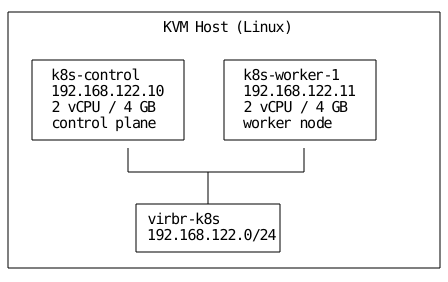
What we are building
Prerequisites
The KVM host needs the following packages installed. Commands are for Debian/Ubuntu.
 1
 2
 3
 4
 5
 6
 7
 8
 9
10
11
12
13
14
15
16
17
18
19
20
21
| # Virtualization stack
sudo apt-get update
sudo apt-get install -y \
qemu-kvm libvirt-daemon-system libvirt-clients \
bridge-utils virtinst virt-manager
# Terraform (via HashiCorp APT repo)
wget -O- https://apt.releases.hashicorp.com/gpg | \
sudo gpg --dearmor -o /usr/share/keyrings/hashicorp-archive-keyring.gpg
echo "deb [signed-by=/usr/share/keyrings/hashicorp-archive-keyring.gpg] \
https://apt.releases.hashicorp.com $(lsb_release -cs) main" | \
sudo tee /etc/apt/sources.list.d/hashicorp.list
sudo apt-get update && sudo apt-get install -y terraform
# Ansible
sudo apt-get install -y pipx
pipx install ansible-core
pipx inject ansible-core kubernetes # for k8s modules later
# Misc
sudo apt-get install -y mkisofs xsltproc
|
Verify the libvirt daemon is running and your user belongs to the libvirt group:
1
2
3
| sudo systemctl enable --now libvirtd
sudo usermod -aG libvirt "$USER"
# Log out and back in for the group change to take effect
|
Confirm nested virtualization or at least KVM support:
1
| virt-host-validate qemu
|
Every check should return PASS. If hardware virtualization fails, enable VT-x / AMD-V in your BIOS.
Project structure
 1
 2
 3
 4
 5
 6
 7
 8
 9
10
11
12
13
14
15
16
17
18
19
20
21
22
23
24
25
26
27
28
29
30
31
32
| k8s-cluster/
├── terraform/
│ ├── main.tf
│ ├── variables.tf
│ ├── outputs.tf
│ ├── versions.tf
│ └── cloud_init/
│ ├── cloud_init_control.cfg
│ └── cloud_init_worker.cfg
├── ansible/
│ ├── inventory.ini
│ ├── ansible.cfg
│ ├── playbooks/
│ │ ├── common.yml
│ │ ├── control_plane.yml
│ │ └── worker.yml
│ └── roles/
│ ├── common/
│ │ └── tasks/
│ │ └── main.yml
│ ├── control_plane/
│ │ ├── tasks/
│ │ │ └── main.yml
│ │ └── handlers/
│ │ └── main.yml
│ └── worker/
│ └── tasks/
│ └── main.yml
├── scripts/
│ ├── deploy.sh
│ └── destroy.sh
└── README.md
|
Provider setup
The dmacvicar/libvirt provider talks directly to the libvirt daemon over its Unix socket.
terraform/versions.tf
 1
 2
 3
 4
 5
 6
 7
 8
 9
10
11
12
13
14
| terraform {
required_version = ">= 1.5.0"
required_providers {
libvirt = {
source = "dmacvicar/libvirt"
version = "~> 0.8.1"
}
}
}
provider "libvirt" {
uri = "qemu:///system"
}
|
If you want to provision VMs on a remote host, change the URI to qemu+ssh://user@remote-host/system.
Variables
terraform/variables.tf
 1
 2
 3
 4
 5
 6
 7
 8
 9
10
11
12
13
14
15
16
17
18
19
20
21
22
23
24
25
26
27
28
29
30
31
32
33
34
35
36
37
38
39
40
41
42
43
44
45
46
47
48
49
50
51
52
53
54
55
56
57
58
59
60
61
62
| variable "cluster_name" {
description = "Prefix used for all resource names"
type = string
default = "k8s"
}
variable "base_image_url" {
description = "URL or local path to a cloud image (qcow2)"
type = string
default = "https://cloud-images.ubuntu.com/releases/24.04/release/ubuntu-24.04-server-cloudimg-amd64.img"
}
variable "storage_pool" {
description = "Libvirt storage pool for VM disks"
type = string
default = "default"
}
variable "network_name" {
description = "Name of the libvirt NAT network"
type = string
default = "k8s-net"
}
variable "network_cidr" {
description = "CIDR for the VM network"
type = list(string)
default = ["192.168.122.0/24"]
}
variable "nodes" {
description = "Map of node definitions"
type = map(object({
role = string
vcpu = number
memory = number # MiB
disk = number # GiB
ip = string
}))
default = {
control = {
role = "control"
vcpu = 2
memory = 4096
disk = 40
ip = "192.168.122.10"
}
worker1 = {
role = "worker"
vcpu = 2
memory = 4096
disk = 40
ip = "192.168.122.11"
}
}
}
variable "ssh_public_key_path" {
description = "Path to the SSH public key injected via cloud-init"
type = string
default = "~/.ssh/id_ed25519.pub"
}
|
Cloud-init templates
Cloud-init handles first-boot configuration: hostname, SSH key injection, package installation, and the kernel modules and sysctl settings Kubernetes requires.
terraform/cloud_init/cloud_init_control.cfg
 1
 2
 3
 4
 5
 6
 7
 8
 9
10
11
12
13
14
15
16
17
18
19
20
21
22
23
24
25
26
27
28
29
30
31
32
33
34
35
36
37
38
39
40
| #cloud-config
hostname: k8s-control
fqdn: k8s-control.local
manage_etc_hosts: true
users:
- name: kube
sudo: ALL=(ALL) NOPASSWD:ALL
shell: /bin/bash
ssh_authorized_keys:
- ${ssh_public_key}
package_update: true
packages:
- qemu-guest-agent
- apt-transport-https
- ca-certificates
- curl
- gnupg
write_files:
- path: /etc/modules-load.d/k8s.conf
content: |
overlay
br_netfilter
- path: /etc/sysctl.d/k8s.conf
content: |
net.bridge.bridge-nf-call-iptables = 1
net.bridge.bridge-nf-call-ip6tables = 1
net.ipv4.ip_forward = 1
runcmd:
- modprobe overlay
- modprobe br_netfilter
- sysctl --system
- systemctl enable --now qemu-guest-agent
power_state:
mode: reboot
condition: true
|
terraform/cloud_init/cloud_init_worker.cfg is identical except hostname: k8s-worker-1 and fqdn: k8s-worker-1.local.
Main configuration
terraform/main.tf
 1
 2
 3
 4
 5
 6
 7
 8
 9
10
11
12
13
14
15
16
17
18
19
20
21
22
23
24
25
26
27
28
29
30
31
32
33
34
35
36
37
38
39
40
41
42
43
44
45
46
47
48
49
50
51
52
53
54
55
56
57
58
59
60
61
62
63
64
65
66
67
68
69
70
71
72
73
74
75
76
77
78
79
80
81
82
83
84
85
86
87
88
89
90
|
resource "libvirt_network" "k8s" {
  name      = var.network_name
  mode      = "nat"
  autostart = true
  addresses = var.network_cidr

  dns {
    enabled    = true
    local_only = true
  }

  dhcp { enabled = false }
}

resource "libvirt_volume" "base" {
  name   = "${var.cluster_name}-base.qcow2"
  pool   = var.storage_pool
  source = var.base_image_url
  format = "qcow2"
}

resource "libvirt_volume" "node" {
  for_each = var.nodes

  name           = "${var.cluster_name}-${each.key}.qcow2"
  pool           = var.storage_pool
  base_volume_id = libvirt_volume.base.id
  format         = "qcow2"
  size           = each.value.disk * 1024 * 1024 * 1024  # bytes
}

data "template_file" "cloud_init" {
  for_each = var.nodes

  template = file(
    "${path.module}/cloud_init/cloud_init_${each.value.role}.cfg"
  )

  vars = {
    ssh_public_key = trimspace(file(pathexpand(var.ssh_public_key_path)))
    hostname       = "${var.cluster_name}-${each.key}"
  }
}

resource "libvirt_cloudinit_disk" "node" {
  for_each = var.nodes

  name      = "${var.cluster_name}-${each.key}-cloudinit.iso"
  pool      = var.storage_pool
  user_data = data.template_file.cloud_init[each.key].rendered
}

resource "libvirt_domain" "node" {
  for_each = var.nodes

  name   = "${var.cluster_name}-${each.key}"
  vcpu   = each.value.vcpu
  memory = each.value.memory

  cloudinit = libvirt_cloudinit_disk.node[each.key].id

  cpu {
    mode = "host-passthrough"
  }

  network_interface {
    network_id     = libvirt_network.k8s.id
    addresses      = [each.value.ip]
    wait_for_lease = true
  }

  disk {
    volume_id = libvirt_volume.node[each.key].id
  }

  console {
    type        = "pty"
    target_type = "serial"
    target_port = "0"
  }

  graphics {
    type        = "vnc"
    listen_type = "address"
    autoport    = true
  }

  qemu_agent = true
}
|
A few things worth noting here. Setting dhcp.enabled = false on the network and assigning static IPs via network_interface.addresses gives us predictable addressing without needing to configure DHCP reservations. The host-passthrough CPU mode exposes the host CPU’s instruction set directly, which avoids performance penalties and is required for some workloads. Each node’s disk is a copy-on-write clone of the base image, so the initial download only happens once.
Outputs
terraform/outputs.tf
 1
 2
 3
 4
 5
 6
 7
 8
 9
10
11
12
13
14
15
16
17
18
19
20
| output "node_ips" {
description = "IP addresses of all nodes"
value = {
for key, domain in libvirt_domain.node :
key => domain.network_interface[0].addresses[0]
}
}
output "control_plane_ip" {
description = "IP of the control plane node"
value = libvirt_domain.node["control"].network_interface[0].addresses[0]
}
output "ssh_command" {
description = "Quick SSH commands"
value = {
for key, domain in libvirt_domain.node :
key => "ssh kube@${domain.network_interface[0].addresses[0]}"
}
}
|
1
2
3
4
| cd terraform/
terraform init
terraform plan -out=tfplan
terraform apply tfplan
|
Terraform downloads the Ubuntu cloud image on the first run , creates the network, stamps out two volumes, generates the cloud-init ISOs, and boots both VMs. The wait_for_lease = true flag blocks until the QEMU guest agent reports an IP, so once apply finishes the VMs are already reachable over SSH.
Verify connectivity:
Part 2. Ansible: bootstrapping Kubernetes
Configuration and inventory
ansible/ansible.cfg
1
2
3
4
5
6
7
8
9
10
| [defaults]
inventory = inventory.ini
remote_user = kube
host_key_checking = False
retry_files_enabled = False
stdout_callback = yaml
[privilege_escalation]
become = True
become_method = sudo
|
ansible/inventory.ini
 1
 2
 3
 4
 5
 6
 7
 8
 9
10
11
12
13
14
15
| [control_plane]
k8s-control ansible_host=192.168.122.10
[workers]
k8s-worker-1 ansible_host=192.168.122.11
[k8s_cluster:children]
control_plane
workers
[k8s_cluster:vars]
ansible_python_interpreter=/usr/bin/python3
k8s_version=1.31
pod_network_cidr=10.244.0.0/16
service_cidr=10.96.0.0/12
|
You can auto-generate this inventory from Terraform outputs. A simple approach:
 1
 2
 3
 4
 5
 6
 7
 8
 9
10
11
12
13
14
15
16
17
18
| cd terraform/
cat <<EOF > ../ansible/inventory.ini
[control_plane]
k8s-control ansible_host=$(terraform output -json node_ips | jq -r '.control')
[workers]
k8s-worker-1 ansible_host=$(terraform output -json node_ips | jq -r '.worker1')
[k8s_cluster:children]
control_plane
workers
[k8s_cluster:vars]
ansible_python_interpreter=/usr/bin/python3
k8s_version=1.31
pod_network_cidr=10.244.0.0/16
service_cidr=10.96.0.0/12
EOF
|
Role: common
This role runs on every node. It installs containerd as the container runtime and the kubeadm/kubelet/kubectl packages.
ansible/roles/common/tasks/main.yml
 1
 2
 3
 4
 5
 6
 7
 8
 9
10
11
12
13
14
15
16
17
18
19
20
21
22
23
24
25
26
27
28
29
30
31
32
33
34
35
36
37
38
39
40
41
42
43
44
45
46
47
48
49
50
51
52
53
54
55
56
57
58
59
60
61
62
63
64
65
66
67
68
69
70
71
72
73
74
75
76
77
78
79
80
81
82
83
84
85
86
87
88
89
90
91
92
93
94
95
96
97
98
99
100
101
102
103
104
105
106
107
108
109
110
111
112
113
114
115
116
117
118
119
120
121
122
123
124
125
126
127
128
129
| ---
- name: Wait for cloud-init to finish
ansible.builtin.command: cloud-init status --wait
changed_when: false
- name: Ensure kernel modules are loaded
community.general.modprobe:
name: "{{ item }}"
state: present
loop:
- overlay
- br_netfilter
- name: Persist kernel module loading
ansible.builtin.copy:
dest: /etc/modules-load.d/containerd.conf
content: |
overlay
br_netfilter
mode: "0644"
- name: Apply sysctl parameters
ansible.posix.sysctl:
name: "{{ item.key }}"
value: "{{ item.value }}"
sysctl_file: /etc/sysctl.d/99-kubernetes.conf
reload: true
loop:
- { key: net.bridge.bridge-nf-call-iptables, value: "1" }
- { key: net.bridge.bridge-nf-call-ip6tables, value: "1" }
- { key: net.ipv4.ip_forward, value: "1" }
- name: Disable swap (runtime)
ansible.builtin.command: swapoff -a
changed_when: false
- name: Disable swap (persistent)
ansible.builtin.replace:
path: /etc/fstab
regexp: '(^[^#].*\sswap\s)'
replace: '# \1'
- name: Install containerd dependencies
ansible.builtin.apt:
name:
- ca-certificates
- curl
- gnupg
state: present
update_cache: true
- name: Add Docker GPG key (containerd ships in the Docker repo)
ansible.builtin.apt_key:
url: https://download.docker.com/linux/ubuntu/gpg
state: present
- name: Add Docker repository
ansible.builtin.apt_repository:
repo: >-
deb [arch=amd64]
https://download.docker.com/linux/ubuntu
{{ ansible_distribution_release }} stable
state: present
filename: docker
- name: Install containerd
ansible.builtin.apt:
name: containerd.io
state: present
update_cache: true
- name: Create containerd config directory
ansible.builtin.file:
path: /etc/containerd
state: directory
mode: "0755"
- name: Generate default containerd config
ansible.builtin.shell: containerd config default > /etc/containerd/config.toml
args:
creates: /etc/containerd/config.toml
- name: Enable SystemdCgroup in containerd
ansible.builtin.replace:
path: /etc/containerd/config.toml
regexp: 'SystemdCgroup\s*=\s*false'
replace: 'SystemdCgroup = true'
notify: restart containerd
- name: Enable and start containerd
ansible.builtin.systemd:
name: containerd
enabled: true
state: started
- name: Add Kubernetes GPG key
ansible.builtin.apt_key:
url: "https://pkgs.k8s.io/core:/stable:/v{{ k8s_version }}/deb/Release.key"
state: present
- name: Add Kubernetes repository
ansible.builtin.apt_repository:
repo: >-
deb https://pkgs.k8s.io/core:/stable:/v{{ k8s_version }}/deb/ /
state: present
filename: kubernetes
- name: Install kubeadm, kubelet, kubectl
ansible.builtin.apt:
name:
- kubelet
- kubeadm
- kubectl
state: present
update_cache: true
- name: Hold Kubernetes packages at current version
ansible.builtin.dpkg_selections:
name: "{{ item }}"
selection: hold
loop:
- kubelet
- kubeadm
- kubectl
- name: Enable kubelet
ansible.builtin.systemd:
name: kubelet
enabled: true
|
Add a handlers file for the containerd restart:
ansible/roles/common/handlers/main.yml
1
2
3
4
5
| ---
- name: restart containerd
ansible.builtin.systemd:
name: containerd
state: restarted
|
Role: control_plane
ansible/roles/control_plane/tasks/main.yml
 1
 2
 3
 4
 5
 6
 7
 8
 9
10
11
12
13
14
15
16
17
18
19
20
21
22
23
24
25
26
27
28
29
30
31
32
33
34
35
36
37
38
39
40
41
42
43
44
45
46
47
48
49
50
51
52
53
54
55
56
57
58
59
60
| ---
- name: Check if cluster is already initialized
ansible.builtin.stat:
path: /etc/kubernetes/admin.conf
register: kubeadm_already_init
- name: Initialize the control plane
ansible.builtin.command: >-
kubeadm init
--apiserver-advertise-address={{ ansible_host }}
--pod-network-cidr={{ pod_network_cidr }}
--service-cidr={{ service_cidr }}
--node-name={{ inventory_hostname }}
when: not kubeadm_already_init.stat.exists
register: kubeadm_init
- name: Create .kube directory for kube user
ansible.builtin.file:
path: /home/kube/.kube
state: directory
owner: kube
group: kube
mode: "0755"
- name: Copy admin.conf to kube user
ansible.builtin.copy:
src: /etc/kubernetes/admin.conf
dest: /home/kube/.kube/config
remote_src: true
owner: kube
group: kube
mode: "0600"
- name: Install Flannel CNI
become: true
become_user: kube
ansible.builtin.command: >-
kubectl apply -f
https://github.com/flannel-io/flannel/releases/latest/download/kube-flannel.yml
when: kubeadm_init is changed
register: flannel_result
retries: 3
delay: 10
until: flannel_result.rc == 0
- name: Generate worker join command
ansible.builtin.command: kubeadm token create --print-join-command
register: join_command_raw
changed_when: false
- name: Store join command as fact
ansible.builtin.set_fact:
join_command: "{{ join_command_raw.stdout }}"
- name: Fetch kubeconfig to local machine
ansible.builtin.fetch:
src: /etc/kubernetes/admin.conf
dest: "{{ playbook_dir }}/../kubeconfig"
flat: true
|
ansible/roles/control_plane/handlers/main.yml
1
2
3
4
5
| ---
- name: restart kubelet
ansible.builtin.systemd:
name: kubelet
state: restarted
|
Role: worker
ansible/roles/worker/tasks/main.yml
 1
 2
 3
 4
 5
 6
 7
 8
 9
10
11
| ---
- name: Check if node has already joined
ansible.builtin.stat:
path: /etc/kubernetes/kubelet.conf
register: kubelet_conf
- name: Join the cluster
ansible.builtin.command: >-
{{ hostvars[groups['control_plane'][0]]['join_command'] }}
--node-name={{ inventory_hostname }}
when: not kubelet_conf.stat.exists
|
The hostvars lookup retrieves the join command that was stored as a fact on the control plane node during its role execution. This keeps the entire flow idempotent. if the worker has already joined, the task is skipped.
Playbooks
ansible/playbooks/common.yml
1
2
3
4
5
| ---
- name: Prepare all nodes
hosts: k8s_cluster
roles:
- common
|
ansible/playbooks/control_plane.yml
1
2
3
4
5
| ---
- name: Bootstrap control plane
hosts: control_plane
roles:
- control_plane
|
ansible/playbooks/worker.yml
1
2
3
4
5
| ---
- name: Join workers to the cluster
hosts: workers
roles:
- worker
|
Running the playbooks
Execute them in order:
 1
 2
 3
 4
 5
 6
 7
 8
 9
10
| cd ansible/
# 1. Common setup on all nodes (containerd, kubeadm, sysctl, etc.)
ansible-playbook playbooks/common.yml
# 2. Initialize the control plane and install Flannel
ansible-playbook playbooks/control_plane.yml
# 3. Join the worker
ansible-playbook playbooks/worker.yml
|
Or wrap everything in a single master playbook:
ansible/site.yml
1
2
3
4
| ---
- import_playbook: playbooks/common.yml
- import_playbook: playbooks/control_plane.yml
- import_playbook: playbooks/worker.yml
|
1
| ansible-playbook site.yml
|
Part 3. Verification
Check node status
The kubeconfig file was fetched to the project root during the control plane playbook. Export it and verify:
1
2
3
4
5
6
7
| export KUBECONFIG=$(pwd)/kubeconfig
# Rewrite the server address if needed (e.g., from internal hostname)
kubectl config set-cluster kubernetes \
--server=https://192.168.122.10:6443
kubectl get nodes -o wide
|
Expected output:
1
2
3
| NAME STATUS ROLES AGE VERSION INTERNAL-IP OS-IMAGE
k8s-control Ready control-plane 5m v1.31.x 192.168.122.10 Ubuntu 24.04 LTS
k8s-worker-1 Ready <none> 3m v1.31.x 192.168.122.11 Ubuntu 24.04 LTS
|
Both nodes should show Ready within a minute or two of the playbooks completing. If a node stays in NotReady, check the Flannel pods:
1
| kubectl get pods -n kube-flannel
|
Deploy a test workload
1
2
3
4
| kubectl create deployment nginx --image=nginx:stable --replicas=2
kubectl expose deployment nginx --port=80 --type=NodePort
kubectl get pods -o wide
kubectl get svc nginx
|
Confirm that pods are scheduled across both nodes and that you can reach nginx via the NodePort:
1
2
3
| NODE_PORT=$(kubectl get svc nginx \
-o jsonpath='{.spec.ports[0].nodePort}')
curl http://192.168.122.11:${NODE_PORT}
|
1
2
| kubectl run busybox --image=busybox --rm -it --restart=Never -- \
sh -c 'wget -qO- http://kubernetes.default.svc.cluster.local/healthz'
|
This should return ok, confirming in-cluster DNS and API server reachability.